I Proctored LAB664 and Co-Hosted a Table Talk at Microsoft Ignite 2026. Here Is What AI Agents Need Before They Can Act
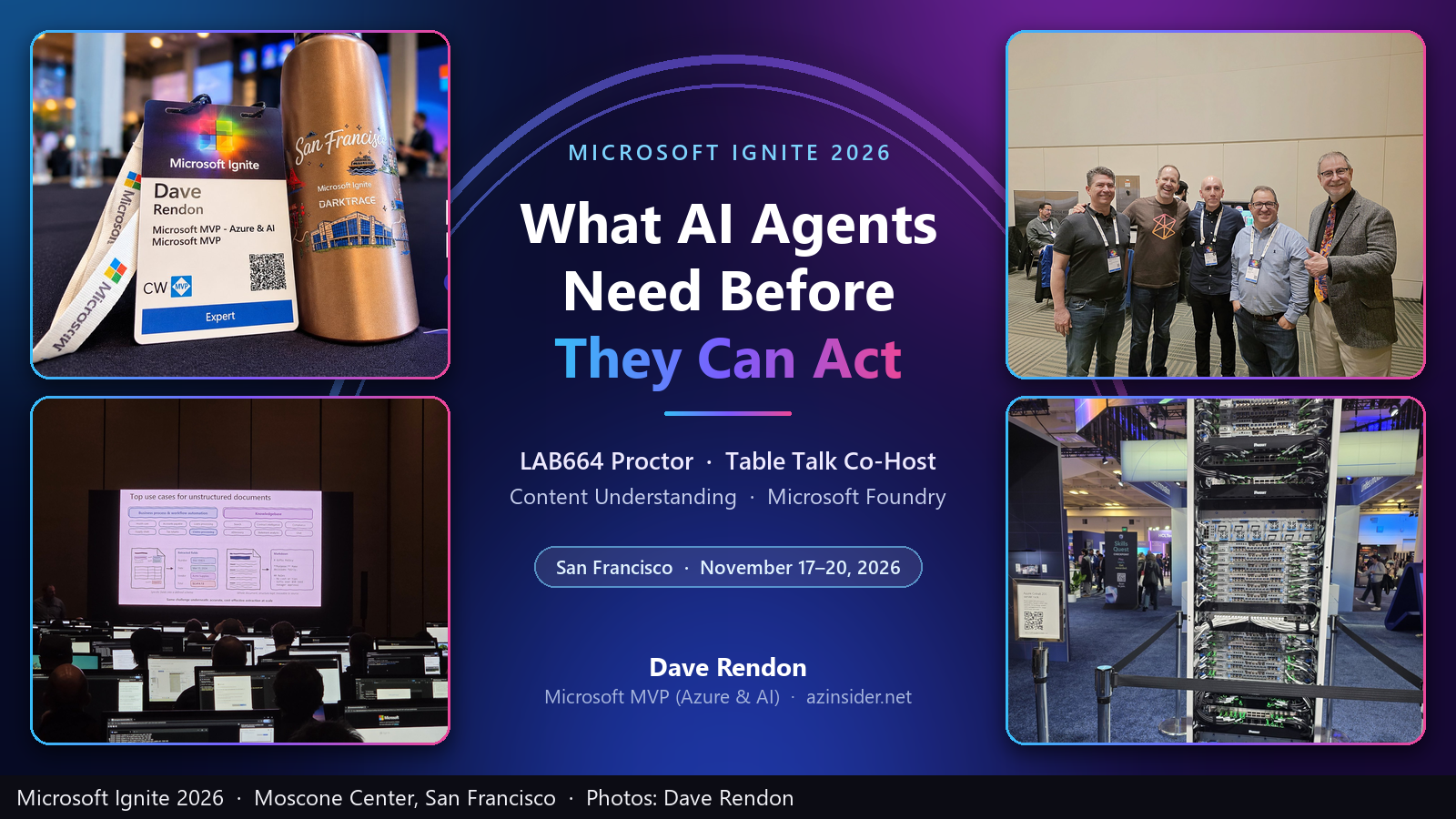
A packed lab room, a stack of messy insurance claim packets, and one question on every screen: can an AI agent read this well enough to act on it? I spent the week of Microsoft Ignite 2026 in San Francisco as a proctor for LAB664 and a co-host of a Table Talk, and I watched attendees answer that question with their own hands. My verdict: AI agents are ready for real business work, as long as they can show where every fact came from and hand the uncertain cases to a human. This is the story of that week, day by day, and what I would build next.
#MSIgnite lab664 Build agentic document workflows with Content Understanding- full room! pic.twitter.com/x4tECx7GEK
— 𝙳𝚊𝚟𝚎 𝚁𝚎𝚗𝚍𝚘𝚗 ☁ Microsoft MVP AI #MSIgnite (@DaveRndn) November 18, 2026
Wednesday morning, Moscone West, Room 3011: LAB664 “Build agentic document workflows with Content Understanding” with a full room.
The short version, if you only have 30 seconds:
- The lab: LAB664 taught people to turn unstructured insurance documents into source-linked facts, run grounded policy checks, and route uncertain results to human review. The full lab is public on GitHub and runs on your laptop.
- The keynote: Satya Nadella framed Ignite 2026 around three priorities: human ambition, owning your organization’s intelligence, and trust.
- The lesson: Understanding comes before action. An agent that cannot prove what it read should not be trusted to act on it.
The one sentence that explains Microsoft Ignite 2026
If I had to summarize the whole week in one line, it would be this: agents are ready to do real work, and the teams that win will be the ones that can prove what their agents read, decided, and did.
Every big announcement fit that sentence. Copilot is becoming the place where people and agents work together. Microsoft IQ gives agents shared, governed context. Agent 365 governs the agents themselves. And at the very bottom of the stack, in a lab room in Moscone West, Azure Content Understanding turned scanned PDFs into facts an agent can cite.
That last part is where my week was centered. Here is how it unfolded.
Day 0 (Monday, November 16): Badge, swag, and a quiet Moscone
Arriving the day before the keynote is the best decision you can make at a conference this size. Badge pickup is quicker, the halls are calmer, and you can walk the campus before twenty things compete for your attention.
Hello, San Francisco! 🌉
— 𝙳𝚊𝚟𝚎 𝚁𝚎𝚗𝚍𝚘𝚗 ☁ Microsoft MVP AI #MSIgnite (@DaveRndn) November 16, 2026
Badge secured. Ignite 2026 swag collected. Ready for #MSIgnite! 🚀
Excited for a week of Agentic AI, Azure, Microsoft Foundry & connecting with the MVP community.#MicrosoftMVP #Azure #AI #MVPBuzz pic.twitter.com/oUB1kcU48D
My plan for the week was simple: two community commitments, one Table Talk and one hands-on lab, plus as much time as possible with the people building Azure, Microsoft Foundry, and agentic AI.
Day 1 (Tuesday, November 17): The keynote that set the frame
Ignite 2026 opened at Chase Center with Satya Nadella’s keynote, and the framing was clear from the first minutes. Microsoft is building what Nadella called a frontier ecosystem, organized around three priorities:
- Keep human ambition at the center.
- Give every organization ownership of its own intelligence and learning.
- Build trust.
The announcements mapped neatly to those three ideas:
- Copilot as “the new OS for work.” Chat, Cowork, Code, and Autopilot come together in one experience, and Copilot Workspaces gives people and agents a shared space to work toward a common goal with shared context.
- Microsoft IQ. The intelligence layer under Copilot becomes a platform you can build on and control, bringing together Work IQ, Fabric IQ, Foundry IQ, and Web IQ with hundreds of new connectors.
- New models. Microsoft-Decision-1.1 is generally available, GPT 6.2 and Meta’s latest models are coming to Foundry, and new MAI models arrived for coding and security.
- Agent 365. The control plane for agent governance, identity, and security, which Microsoft says already holds more than 50 million agents. Agent 365 Business Analytics connects AI spend to business outcomes.
- Perception. An agentic security system with red, blue, and green agent teams for attack simulation, detection, and remediation, now generally available.
- The Microsoft AI Transparency Initiative. An open standards effort with 40 organizations involved so far, working alongside NIST’s Agent Standards Initiative.
- Silicon. Cobalt 200 VMs are generally available, and Maia 300 is the next AI accelerator, which Microsoft describes as delivering 40 percent more tokens per watt than leading GPU-based systems.
One line from the keynote stayed with me all week: “We need to be able to examine what AI sees and does.” I did not know yet that I would see that sentence turn into a working app the very next morning.
The rest of Tuesday was a firehose. A few announcements I shared that afternoon because they solve problems many teams face every week:
- Plugins for Microsoft Copilot: skills, tools, and agents with unified discovery and a new public Plugin Catalog.
- Azure Container Apps for agents: Sandboxes (isolated microVMs) and Express are generally available.
- Kubernetes Center: fleet upgrades, node and pod monitoring, and an AI Manager for AKS.
- Azure Monitor Health Models (GA): dependency-aware health with business impact, so you can tell healthy apps from noisy ones.
- Azure Observability Skills Plugin: GitHub Copilot plus Azure Monitor guidance to detect, investigate, remediate, and validate.
- AI for FinOps: the Azure Cost plugin and ARM MCP bring cost insights into GitHub Copilot, and Azure Copilot adds AI-powered optimization.
New at #MSIgnite: Plugins for Microsoft Copilot!
— 𝙳𝚊𝚟𝚎 𝚁𝚎𝚗𝚍𝚘𝚗 ☁ Microsoft MVP AI #MSIgnite (@DaveRndn) November 17, 2026
Skills + Tools + Agents, unified discovery and a new public Plugin Catalog.#Copilot #AIhttps://t.co/7XazMJmJg1 pic.twitter.com/g19Exh09rg
New at #MSIgnite: Azure Observability Skills Plugin!@github Copilot + @Azure Monitor guidance for smarter troubleshooting:
— 𝙳𝚊𝚟𝚎 𝚁𝚎𝚗𝚍𝚘𝚗 ☁ Microsoft MVP AI #MSIgnite (@DaveRndn) November 17, 2026
Detect → Investigate → Remediate → Validate#Azure #DevOps #Microsoft https://t.co/FRhGP0Zh6w pic.twitter.com/BtaMJOfASI
AI for FinOps at #MSIgnite!
— 𝙳𝚊𝚟𝚎 𝚁𝚎𝚗𝚍𝚘𝚗 ☁ Microsoft MVP AI #MSIgnite (@DaveRndn) November 17, 2026
Azure Cost plugin + ARM MCP bring cost insights to GitHub Copilot. Azure Copilot adds AI-powered optimization.https://t.co/SSzV6O78LT#Azure #FinOps pic.twitter.com/Py9DpPnUZd
Day 2 (Wednesday, November 18): Table 9 at 9:00, Room 3011 at 10:15
Wednesday was the day I had been preparing for since September, and it started early.
Ready for Day 2 at #MSIgnite!
— 𝙳𝚊𝚟𝚎 𝚁𝚎𝚗𝚍𝚘𝚗 ☁ Microsoft MVP AI #MSIgnite (@DaveRndn) November 18, 2026
I'll be speaking and proctoring labs
Talk: Turn #Microsoft Ignite Insights into Real-World Impact.https://t.co/FnJchHQv5i
LAB664 Building agentic workflows with #Azure Content Understanding.https://t.co/WZ8ucr5Afk#AI #MVPBuzz #MicrosoftIgnite pic.twitter.com/OELdYuX3gs
The Table Talk: Turn Microsoft Ignite Insights into Real-World Impact
At 9:00 AM, in the Esplanade Ballroom of Moscone South, I sat down at Table 9 for Table Talk TT17972 with my co-hosts Justin Garrett from Microsoft Developer Relations and Mariusz Ferdyn.
The premise of the session is something every attendee needs and almost nobody plans for: how do you get lasting value from Ignite after the badge comes off? The table focused on three moves:
- Capture the takeaways while they are fresh.
- Decide what actually matters for your team, and drop the rest.
- Share what you learned through enablement sessions, presentations, blogs, videos, social posts, and local community events.
Table Talks are small by design: a table, a topic, and a conversation. That makes them one of the most honest formats at Ignite. You hear what people are really working through, and you leave with ideas you did not bring.
This article is me practicing what we discussed at Table 9.
LAB664: a full room
At 10:15 AM I was across the street in Moscone West, Room 3011, for the first delivery of LAB664: Build agentic document workflows with Content Understanding, facilitated by Carlotta Castelluccio and Joe Filcik, with proctors in the room to help.
By 10:43 AM, every seat was taken.
Wednesday also brought some of the most practical agent announcements of the week:
- Microsoft IQ: Work, Fabric, Foundry, and Web IQ as one governed context for your agents.
- Foundry IQ, managed for you: knowledge bases and agentic retrieval inside Foundry projects, with no separate search service to manage.
- Foundry Agent Service: generally available voice agents, a Copilot harness (preview), and enterprise controls for hosted agents.
- Observe agents built outside Foundry (GA): register, trace, and evaluate external agents in production.
- Agent Controls (preview): runtime policies that allow, deny, or transform an agent’s actions. Guard the action, not just the answer.
- Foundry FinOps (preview): agent cost visibility, quality-aware optimization, and budget controls.
- Skills over MCP in VS Code 1.147+: load skills from MCP servers alongside tools and auth, instead of copying skills into every agent.
Your agent runs outside Foundry? Keep it there.
— 𝙳𝚊𝚟𝚎 𝚁𝚎𝚗𝚍𝚘𝚗 ☁ Microsoft MVP AI #MSIgnite (@DaveRndn) November 18, 2026
At #MSIgnite: register, trace & evaluate external agents in production (GA).https://t.co/YBMLposTX9#MicrosoftIgnite #Microsoft #AI #Agents pic.twitter.com/VVCIEDFUov
And because Ignite is really about people, the afternoon also gave me one of my favorite moments of the week: running into Scott Hanselman and Jeffrey Snover.
Ran into some of my favorite people at @Microsoft Ignite 2026!@shanselman @jsnover #MSIgnite #MVPBuzz #Community #Microsoft pic.twitter.com/DHTFdoNP6L
— 𝙳𝚊𝚟𝚎 𝚁𝚎𝚗𝚍𝚘𝚗 ☁ Microsoft MVP AI #MSIgnite (@DaveRndn) November 18, 2026
Inside LAB664: from a messy claim packet to a decision you can defend
Here is why this lab matters, even if you never work in insurance.
Enterprise processes start with unstructured content: documents, images, audio, video, and emails. Before an AI agent can act on any of it, it has to understand and structure it. LAB664 makes that real with a synthetic insurance scenario: policy declarations, scanned effective-date records, a state amendment, and a repair-review diagram.
Attendees worked through a nine-step guide in two parts. First, extraction in Content Understanding Studio. Then, policy checks in a separate Insurance Workbench app. By the end, they could:
- Extract structured, source-linked facts with prebuilt and custom Content Understanding analyzers.
- Classify and split insurance packets and route each document to the right extraction analyzer.
- Evaluate claims with business rules, grounded policy checks, and human review.
The workbench runs three checks for every claim: Daily rate, Effective terms, and Repair estimate. Each result is one of three states: a check mark for Satisfied, an open circle for Review required, and a circular arrow for Waiting for info. For example, one packet compares a claimed rental rate of $61 per day against an $85 contractual cap. Every value links back to its source PDF, so a reviewer can see the evidence behind it.
This is the part I find most important. Remember the keynote line about examining what AI sees and does? In Room 3011, that is one click on a source link. The lab is also explicit that these are evidence-based reviews, not coverage or payment approvals. The agent prepares the decision; a person owns it.
The stack behind the lab:
- Azure Content Understanding for extraction, classification, and routing
- Azure Document Intelligence for proven document parsing
- Microsoft Foundry as the platform
- Azure AI Search for grounded policy retrieval
- Microsoft Agent Framework for the agent logic
What a lab proctor actually does
When the Ignite lab team accepted me as a proctor back in September, the role was described plainly. Each lab has two speakers and up to three proctors. Before the event, proctors connect with the speakers, test the lab, and suggest improvements. On the day, we are in the room 15 minutes before the start, and during the lab we answer questions and unblock attendees.
The goal is simple: make the first minutes painless so every attendee reaches the interesting part. In a 75-minute lab, every minute someone spends stuck on setup is a minute they do not spend learning.
One detail I loved: the lab kept improving during the week itself. The LAB664 repository merged fixes to slides on Wednesday and updates to instructions, screenshots, and API version reminders for custom analyzers on Thursday, based on feedback. A good lab is a living product, not a static script.
Try LAB664 yourself
You do not need to have been in San Francisco. The full lab is public, and the workbench runs locally on Windows with Python 3.10 or later:
1
2
3
4
git clone https://github.com/microsoft/ignite26-LAB664
cd ignite26-LAB664
powershell -ExecutionPolicy Bypass -File .\infra\setup.ps1
powershell -ExecutionPolicy Bypass -File .\infra\launch-workbench.ps1
Then open http://127.0.0.1:8791/. The app loads the included extraction results and all 30 saved policy checks with no Azure sign-in or credentials, so you can explore the full workflow before you spend anything. When you are ready for live analysis, sign in with az login, configure the index, and enable live calls in Settings. Live runs use your Azure subscription and incur charges.
If you prefer the command line, the Content Understanding CLI is now in preview. You use azd ai cu to analyze files, manage analyzers, and configure model defaults.
For documents that need more than one pass, Content Understanding also offers agentic mode (preview), which reasons across a document, performs calculations, validates results, and interprets tables and figures. Microsoft’s own guidance is worth repeating: it does not replace human review in high-impact scenarios.
Day 3 (Thursday, November 19): Two more runs and agents with their own identity
Ready for Day 3 at @Microsoft Ignite 2026 in San Francisco!
— 𝙳𝚊𝚟𝚎 𝚁𝚎𝚗𝚍𝚘𝚗 ☁ Microsoft MVP AI #MSIgnite (@DaveRndn) November 19, 2026
LAB664: Exploring how Azure Content Understanding powers agentic document workflows, from unstructured content to intelligent automation.Looking forward to a great day with the community!#AgenticAI #Microsoft #MSIgnite pic.twitter.com/69dmfWTaoq
Thursday brought two more LAB664 deliveries in Room 3011, at 10:45 AM and 2:45 PM. That morning I also walked the Hub, stopped by the Formula 1 experience, and got up close to an Azure Cobalt 200 server rack.
#Azure Cobalt 200 server rack Microsoft Ignite 2026 #MSIgnite https://t.co/AXgqDydQlM pic.twitter.com/aevFGMuFVU
— 𝙳𝚊𝚟𝚎 𝚁𝚎𝚗𝚍𝚘𝚗 ☁ Microsoft MVP AI #MSIgnite (@DaveRndn) November 19, 2026
Thursday’s announcements pushed agents from “assistant” toward “teammate”:
- Autopilot: Copilot moves beyond chat, with persistent memory, its own identity, and a workspace to take on real work.
- Agents as real teammates: every Foundry agent has its own Microsoft Entra agent identity, and autonomous agents can also get an agent user account with their own email, calendar, OneDrive, and Teams presence. They work for you, not as you.
- Foundry agents on your own AKS clusters: the same APIs and deployment experience, with isolated agent sessions and full control over your infrastructure. Public preview is targeted for early December.
- Microsoft and Oracle: governed MCP access to Oracle AI Database, connecting enterprise data with Foundry agents, Copilot, and Excel.
- Maia 300 is coming in 2027.
What if your AI agents could join Teams as actual teammates?
— 𝙳𝚊𝚟𝚎 𝚁𝚎𝚗𝚍𝚘𝚗 ☁ Microsoft MVP AI #MSIgnite (@DaveRndn) November 19, 2026
Microsoft Foundry gives agents their own Entra identity, Microsoft 365 account, permissions and audit trail.
They work for you, not as you.https://t.co/zYrGpDFe62#Azure #AgenticAI #Microsoft #MSIgnite #AI pic.twitter.com/x1nMbaY1q2
Notice the pattern. Identity, audit trails, runtime controls, source links. The week kept returning to the same idea from different directions: an agent is only as useful as your ability to trust it.
Day 4 (Friday, November 20): Half day, full notebook
Ready for the Final day of Microsoft Ignite 2026!
— 𝙳𝚊𝚟𝚎 𝚁𝚎𝚗𝚍𝚘𝚗 ☁ Microsoft MVP AI #MSIgnite (@DaveRndn) November 20, 2026
An incredible week of #Azure, Microsoft Foundry, agentic #AI, and connecting with the community.
Now it's time to turn these innovations into real-world impact. The real work starts after Ignite!#AgenticAI #Microsoft #MSIgnite pic.twitter.com/zEWkADERKf
Friday at Ignite is a half day, and it has a different energy. The rush is over, conversations get longer, and everyone starts thinking about Monday. The last announcements I shared were the kind that make operations teams quietly happy:
- Azure SRE Agent in Azure Managed Grafana (preview): investigate incidents from the dashboard, approve actions, and verify recovery.
- SQL storage for Hybrid Logic Apps (GA): keep workflow state in your own environment with your existing SQL backup and DR practices.
- MSMQ built-in connector for Logic Apps Standard (preview): a practical bridge for modernizing BizTalk and legacy integrations.
- Azure Backup for Cosmos DB (GA): immutable, isolated backups with up to 10 years of retention.
As I wrote that morning: the real work starts after Ignite.
The announcements I would act on first
Ignite produces more news than any team can absorb. Following the advice from our Table Talk, here is what I decided matters most for builders working on agents, grouped by the job it does:
| Job | What to look at first |
|---|---|
| Understand unstructured content | Azure Content Understanding, including the CLI (preview) and agentic mode (preview) |
| Ground agents in your data | Microsoft IQ and Foundry IQ, including a managed Foundry IQ resource in new Foundry projects (preview) |
| Run agents where you need them | Foundry Agent Service hosted agents, including your own AKS clusters (preview targeted for early December) |
| Govern agents like employees | Agent 365, agent identity in Entra, and Agent Controls (preview) |
| Improve agents in production | Continuous improvement in Foundry: multi-turn evaluation and production insights, both generally available |
| Control cost | Foundry FinOps (preview) and Agent 365 Business Analytics |
Turning Ignite into real-world impact: a 30-day plan
This is the playbook we talked about at Table 9, turned into something you can start tomorrow:
- Week 1, explore: Clone LAB664 and run the workbench with the bundled results. Click every source link, and look closely at the cases marked Review required and why.
- Week 2, try your own content: Pick five real documents from one process in your organization and run them through Content Understanding with the CLI or the Foundry portal.
- Week 3, design the handoff: Decide which results can flow straight through and which must go to a person. Write that rule down before you write any agent code.
- Week 4, share: Present what you learned to your team, write a short post, or bring it to your local user group. Teaching is the fastest way to find the gaps in your own understanding.
Frequently asked questions
What was LAB664 at Microsoft Ignite 2026? LAB664, “Build agentic document workflows with Content Understanding,” was a hands-on lab where attendees used Azure Content Understanding in an agent loop to extract, classify, and route business documents, with confidence-based automation and human-in-the-loop review.
Can I still take LAB664? Yes. The lab guide and workbench are public at https://github.com/microsoft/ignite26-LAB664. The workbench runs locally with bundled results and needs no Azure credentials until you choose to run live analysis.
What were the biggest announcements at Microsoft Ignite 2026? Copilot as the new OS for work (Chat, Cowork, Code, Autopilot, and Copilot Workspaces), Microsoft IQ, Agent 365, Perception, the Microsoft AI Transparency Initiative, Maia 300, and Cobalt 200 VMs. The Book of News has the complete list.
What does a Microsoft Ignite lab proctor do? Proctors test the lab before the event, arrive early, and help attendees during the session by answering questions and unblocking them, so the speakers can keep the whole room moving.
Final Thoughts
The moment that stays with me from Ignite was not on a keynote stage. It is a small one that LAB664 is built around: you click a source link, and the original document opens with the evidence the agent used. That is what trust looks like in practice. Not a promise, but a click.
The week taught me three simple things. Understanding comes before action. An agent cannot make a good decision about a document it has not truly read. Evidence comes before automation. If the agent cannot show its source, the result is not ready to act on. People own the hard calls. The best workflows I saw this week were not the ones that removed humans; they were the ones that gave humans better, faster, well-documented decisions.
And the Table Talk taught me something about Ignite itself. The value of a conference is not measured in the sessions you attended. It is measured in what you do in the weeks after. So here is my invitation: clone the LAB664 repo, run it with your own documents, and share what you learn. If you write about it, tag me. I would love to read it.
See you at the next one.
Dave Rendon, Microsoft MVP (Azure and AI) and Microsoft Certified Trainer
Links and references
Microsoft Learn
- What is Azure Content Understanding in Foundry Tools: https://learn.microsoft.com/en-us/azure/ai-services/content-understanding/overview?WT.mc_id=AZ-MVP-5000671
- What’s new in Content Understanding: https://learn.microsoft.com/en-us/azure/ai-services/content-understanding/whats-new?WT.mc_id=AZ-MVP-5000671
- Content Understanding CLI quickstart: https://learn.microsoft.com/en-us/azure/ai-services/content-understanding/quickstart/use-content-understanding-cli?WT.mc_id=AZ-MVP-5000671
- Agentic mode for document analysis (preview): https://learn.microsoft.com/en-us/azure/ai-services/content-understanding/concepts/agentic-mode?WT.mc_id=AZ-MVP-5000671
- Prebuilt analyzers: https://learn.microsoft.com/en-us/azure/ai-services/content-understanding/concepts/prebuilt-analyzers?WT.mc_id=AZ-MVP-5000671
- What is Microsoft Foundry: https://learn.microsoft.com/en-us/azure/foundry/what-is-foundry?WT.mc_id=AZ-MVP-5000671
- What is Microsoft Foundry Agent Service: https://learn.microsoft.com/en-us/azure/foundry/agents/overview?WT.mc_id=AZ-MVP-5000671
- What is Foundry IQ: https://learn.microsoft.com/en-us/azure/foundry/agents/concepts/what-is-foundry-iq?WT.mc_id=AZ-MVP-5000671
- Agentic retrieval in Foundry IQ (Azure AI Search): https://learn.microsoft.com/en-us/azure/search/agentic-retrieval-overview?WT.mc_id=AZ-MVP-5000671
- Microsoft Agent Framework overview: https://learn.microsoft.com/en-us/agent-framework/overview/?WT.mc_id=AZ-MVP-5000671
- Microsoft Agent 365 overview: https://learn.microsoft.com/en-us/microsoft-agent-365/overview?WT.mc_id=AZ-MVP-5000671
- Microsoft Learn MCP Server overview: https://learn.microsoft.com/en-us/training/support/mcp?WT.mc_id=AZ-MVP-5000671
GitHub
- LAB664 lab repository: https://github.com/microsoft/ignite26-LAB664
- Microsoft Ignite 2026 Next Steps (all session repos): https://github.com/microsoft/ignite26-next-steps
- Microsoft Foundry Ignite 2026 demos: https://github.com/microsoft-foundry/ignite-2026-demos
Official Microsoft Ignite 2026 news
- Satya Nadella’s keynote, “Ignite 2026: Building the frontier ecosystem”: https://blogs.microsoft.com/blog/2026/11/17/ignite-2026-building-the-frontier-ecosystem/
- Microsoft Ignite 2026 Book of News: https://news.microsoft.com/events/ignite/2026/book-of-news/
- Introducing the new Microsoft IQ: https://azure.microsoft.com/en-us/blog/introducing-the-new-microsoft-iq-putting-your-organizations-intelligence-to-work-in-every-agent/?WT.mc_id=AZ-MVP-5000671
- What’s new in Foundry Agent Service at Ignite 2026: https://devblogs.microsoft.com/foundry/whats-new-in-foundry-agent-service-at-ignite-2026/?WT.mc_id=AZ-MVP-5000671
- Hosted agents in Foundry Agent Service: https://devblogs.microsoft.com/foundry/hosted-agents-foundry-agent-service-ignite-2026/?WT.mc_id=AZ-MVP-5000671
- Build trusted autonomous agents for your team with Microsoft Foundry: https://devblogs.microsoft.com/foundry/build-trusted-autonomous-agents-for-your-team-with-microsoft-foundry/?WT.mc_id=AZ-MVP-5000671
- Foundry IQ, now managed for you in every Foundry project: https://techcommunity.microsoft.com/blog/azure-ai-foundry-blog/foundry-iq-now-managed-for-you-in-every-foundry-project/4573316?WT.mc_id=AZ-MVP-5000671
- Observe and improve agents built outside Foundry: https://techcommunity.microsoft.com/blog/azure-ai-foundry-blog/observe-and-improve-agents-built-outside-foundry/4574508?WT.mc_id=AZ-MVP-5000671
- Introducing Agent Controls: https://commandline.microsoft.com/introducing-agent-controls-an-enterprise-control-plane-for-agent-behavior/?WT.mc_id=AZ-MVP-5000671
- Autopilot, meet your trusted personal teammate: https://techcommunity.microsoft.com/blog/microsoft-copilot-blog/autopilot-meet-your-trusted-personal-teammate/4572611?WT.mc_id=AZ-MVP-5000671
- Skills over MCP in VS Code: https://techcommunity.microsoft.com/blog/AzureDevCommunityBlog/skills-over-mcp-are-now-available-in-vs-code/4574580?WT.mc_id=AZ-MVP-5000671
- Azure Cobalt 200 VMs now available: https://azure.microsoft.com/en-us/blog/azure-cobalt-200-vms-now-available-proven-on-real-workloads-and-built-for-the-agentic-era/
Sessions
- LAB664: Build agentic document workflows with Content Understanding: https://ignite.microsoft.com/en-US/sessions/1787856872322001hQo8-1791823109402001oX0k?source=sessions
- Table Talk TT17972: Turn Microsoft Ignite Insights into Real-World Impact: https://ignite.microsoft.com/en-US/sessions/1793229491916001rsPs-1793230201682001RbKc?source=sessions
Keep reading
- My Microsoft Build 2026 recap as an Agents and Apps Expert: https://azinsider.net/events/microsoft-build-2026/
- Follow my #MSIgnite posts on X: https://x.com/DaveRndn
#MSIgnite #MicrosoftIgnite #AgenticAI #MicrosoftFoundry #ContentUnderstanding #Azure #MicrosoftMVP #MVPBuzz
 Dive deep into
Azure, learn from the experts, and connect with peers!